── Conflicts ────────────────────────────────────────── tidyverse_conflicts() ──
✖ dplyr::filter() masks stats::filter()
✖ dplyr::lag()    masks stats::lag()
ℹ Use the conflicted package (<http://conflicted.r-lib.org/>) to force all conflicts to become errors
Rows: 1072255 Columns: 42
── Column specification ────────────────────────────────────────────────────────
Delimiter: ","
chr  (28): title, status, backdrop_path, homepage, imdb_id, original_languag...
dbl  (12): id, vote_average, vote_count, revenue, runtime, budget, popularit...
lgl   (1): adult
date  (1): release_date

ℹ Use `spec()` to retrieve the full column specification for this data.
ℹ Specify the column types or set `show_col_types = FALSE` to quiet this message.
df_clean <-read_csv("data/df_clean.csv")
New names:
Rows: 312801 Columns: 9
── Column specification
──────────────────────────────────────────────────────── Delimiter: "," chr
(4): title, status, genre, country dbl (5): ...1, year, revenue, budget, rate
ℹ Use `spec()` to retrieve the full column specification for this data. ℹ
Specify the column types or set `show_col_types = FALSE` to quiet this message.
• `` -> `...1`
Q1
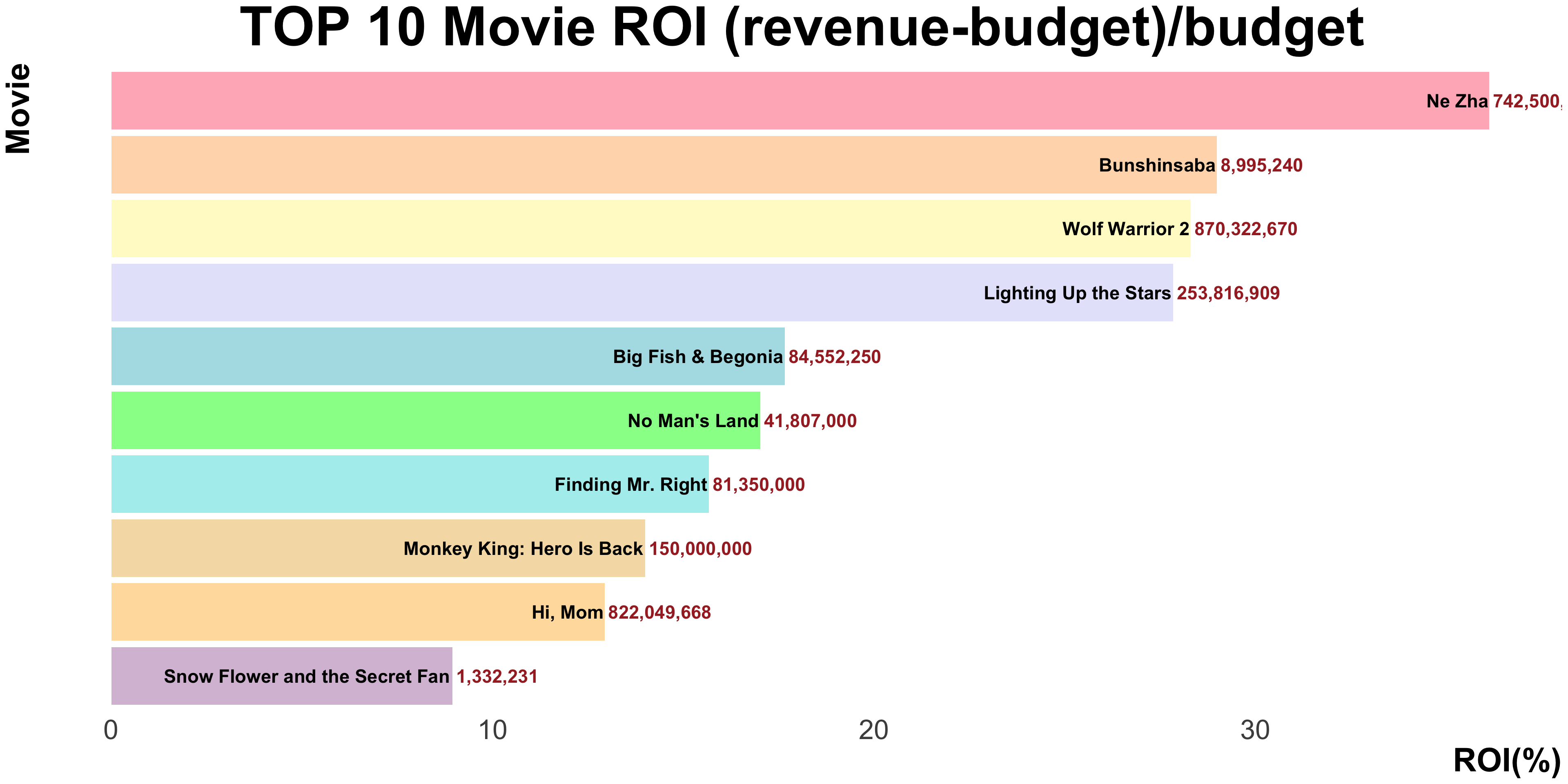
What are the top 10 most profitable movies in China over the past 20 years?
df1 <- df_clean |>filter(country =="China") |>#删掉revenue和budget=0的rowfilter(!(revenue =="0"))|>filter(!(budget =="0"))|>#创造一列ROI=((revenue-budget)/budget)mutate(ROI = (revenue - budget) / budget)|>#删除budget是的row(nchar:字符串长度/数字位数)filter(nchar(as.character(budget)) >3) |>group_by(year) |>select(year, title, genre, ROI, revenue, budget)|>arrange(-ROI)|>#However, since The revenue and budget of No.1 The Loony Park(马赛克大乱斗) and No.11 Sweet Journey(云下的日子) were obviously wrong, we removed these two films from the table.filter(!(title =="The Loony Park"))|>filter(!(title =="Sweet Journey"))|>filter(ROI>7.1892407)|>select(title, ROI, revenue)
Adding missing grouping variables: `year`
glimpse(df1)
Rows: 10
Columns: 4
Groups: year [9]
$ year    <dbl> 2019, 2012, 2017, 2022, 2016, 2013, 2013, 2015, 2021, 2011
$ title   <chr> "Ne Zha", "Bunshinsaba", "Wolf Warrior 2", "Lighting Up the St…
$ ROI     <dbl> 36.125000, 28.984133, 28.303794, 27.842831, 17.658147, 17.0202…
$ revenue <dbl> 742500000, 8995240, 870322670, 253816909, 84552250, 41807000, …
`summarise()` has grouped output by 'country'. You can override using the
`.groups` argument.
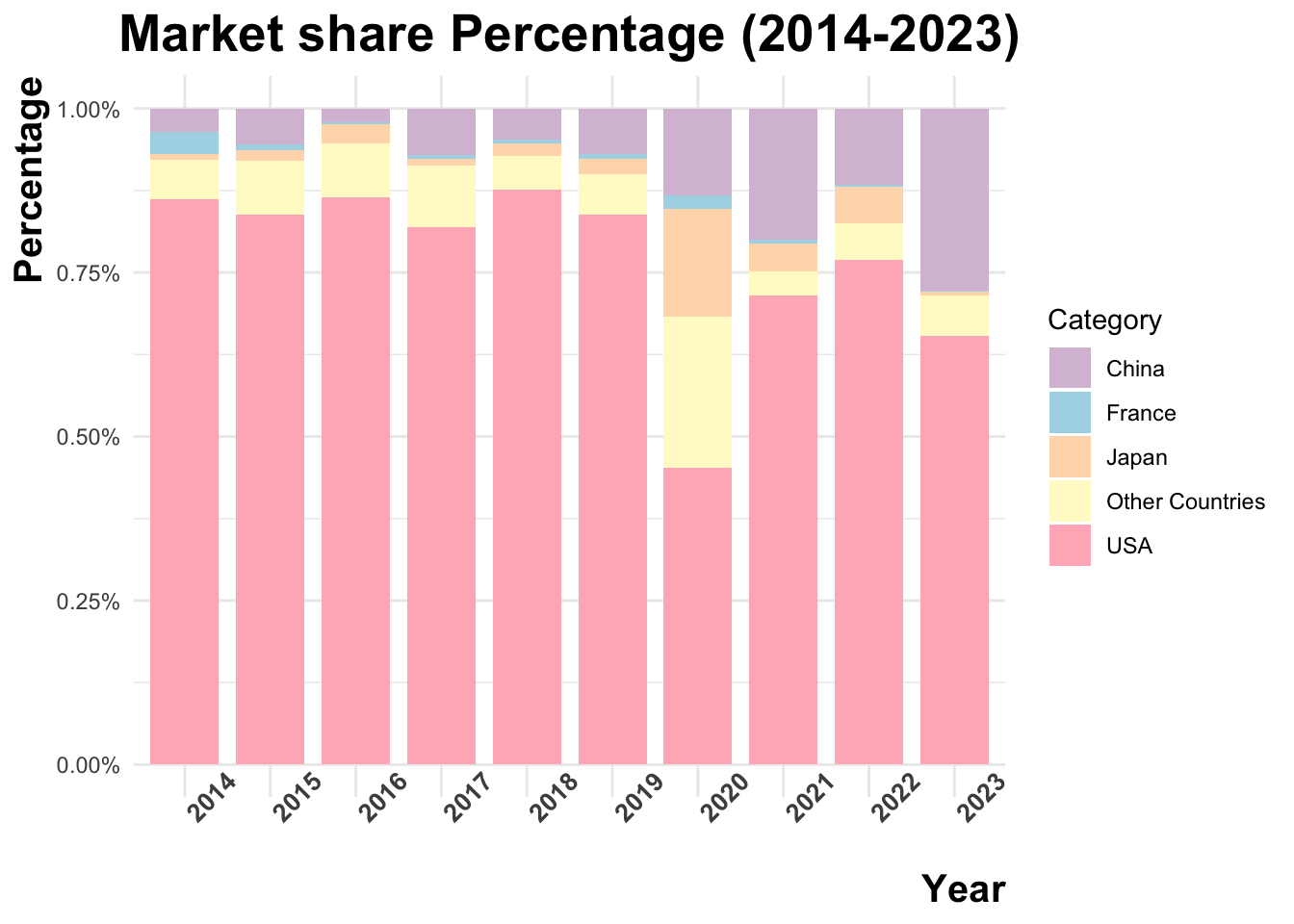
df2 <- df2 |>mutate(category =case_when( country =="China"~"China", country =="United States of America"~"USA", country =="France"~"France", country =="Japan"~"Japan",TRUE~"Other Countries"))
`summarise()` has grouped output by 'category'. You can override using the
`.groups` argument.
print(df2)
# A tibble: 50 × 3
# Groups:   category [5]
   category  year total_revenue
   <chr>    <dbl>         <dbl>
 1 China     2014     744883919
 2 China     2015    1185951291
 3 China     2016     441680092
 4 China     2017    1720894151
 5 China     2018    1173818739
 6 China     2019    1663018812
 7 China     2020     521570577
 8 China     2021    2472642884
 9 China     2022    2149167889
10 China     2023    3342450960
# ℹ 40 more rows
# A tibble: 232 × 2
   country                  number
   <chr>                     <int>
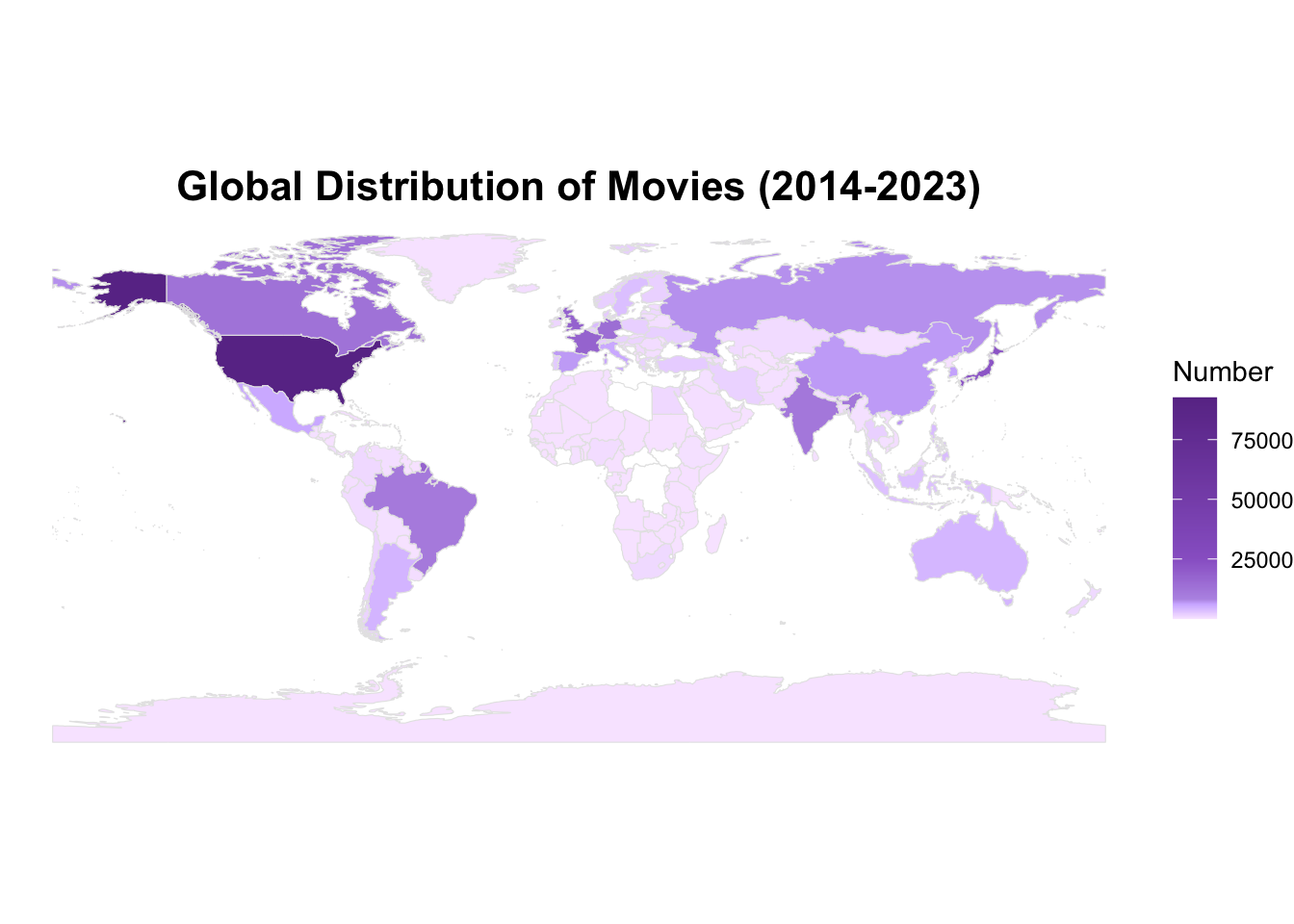
 1 United States of America  92581
 2 Japan                     21813
 3 United Kingdom            17995
 4 France                    17648
 5 Germany                   14224
 6 Canada                    12759
 7 India                     11095
 8 Brazil                    10330
 9 Russia                     7140
10 Spain                      6608
# ℹ 222 more rows
world <-ne_countries(scale ="medium", returnclass ="sf")world_data <- world |>left_join(df3, by =c("name"="country"))
my_colors <-c("#F8E8FF", "#E4CFFF", "#D1B7FF", "#B998E6", "#9966CC", "#6A3795")value_points <-c(0, 3000, 6000, 8000, 25000, max(world_data$number, na.rm =TRUE))ggplot(world_data) +geom_sf(aes(fill = number, geometry = geometry), color ="gray90", size =0.1) +scale_fill_gradientn(colors = my_colors,values = scales::rescale(value_points), na.value ="white" ) +labs(title ="Global Distribution of Movies (2014-2023)",fill ="Number" ) +theme_void() +theme(plot.title =element_text(hjust =0.5, size =16, face ="bold") )
# A tibble: 1,266 × 3
    rate    revenue title
   <dbl>      <dbl> <chr>
 1   8   1518815515 The Avengers
 2   8    783100000 Deadpool
 3   8.4 2052415039 Avengers: Infinity War
 4   8    772776600 Guardians of the Galaxy
 5   7.9  585174222 Iron Man
 6   8.5  425368238 Django Unchained
 7   8.4 2800000000 Avengers: Endgame
 8   8.2  294800000 Shutter Island
 9   8.2  392000000 The Wolf of Wall Street
10   7.3 1405403694 Avengers: Age of Ultron
# ℹ 1,256 more rows
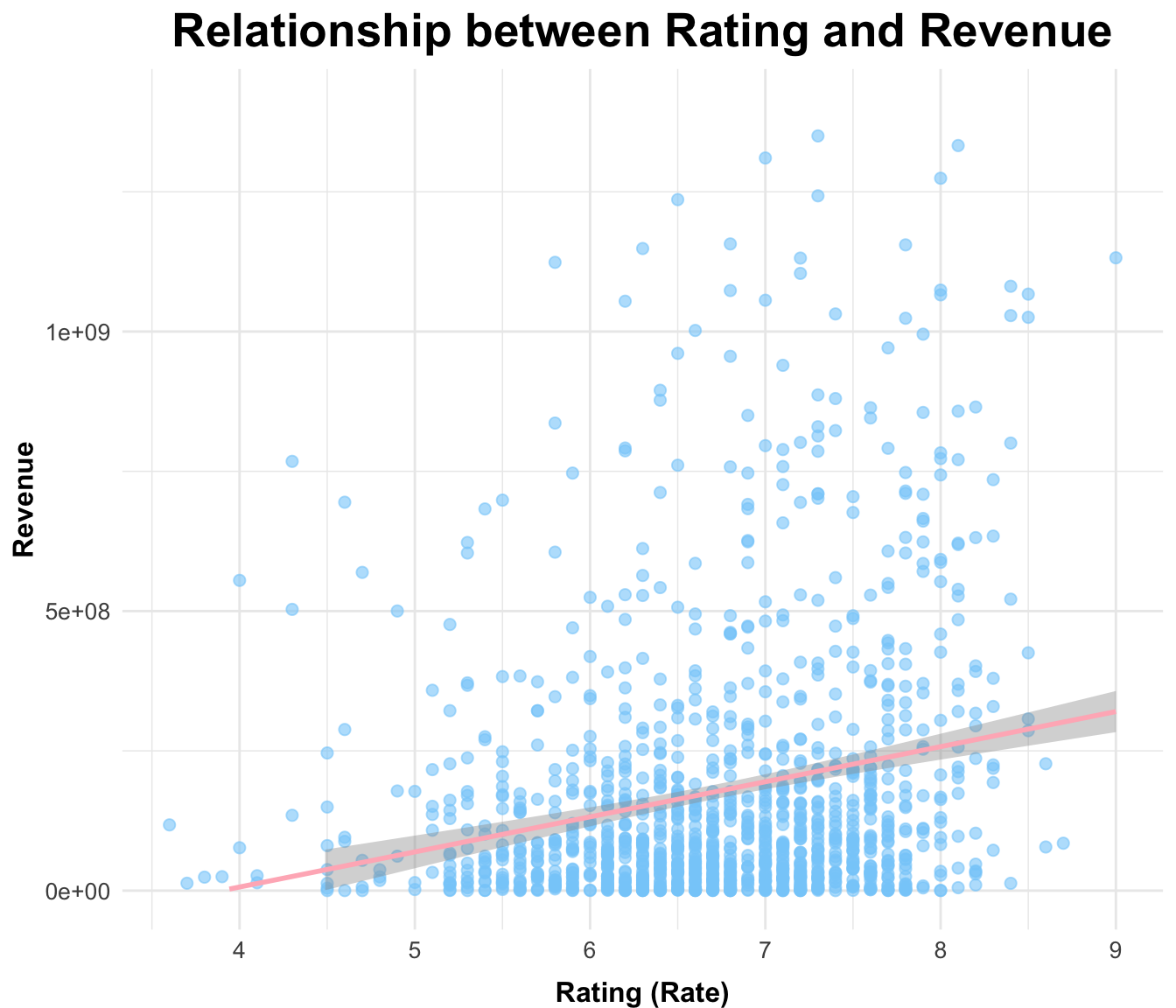
ggplot(df5, aes(x = rate, y = revenue)) +geom_point(color ="#87CEFA", alpha =0.6, size =2) +geom_smooth(method ="lm", color ="#FFB6C1") +# 添加回归线labs(title ="Relationship between Rating and Revenue",x ="Rating (Rate)",y ="Revenue" ) +scale_y_continuous(limits=c(0, max(df5$revenue)*0.5)) +# 设置Y轴上限为最大值的一半theme_minimal() +theme(# 图表标题:大字体,居中,上对齐plot.title =element_text(hjust =0.5, vjust =1, size =20, face ="bold"),# Y轴标题:大字体,上对齐axis.title.y =element_text(size =12, hjust =0.5, vjust =1, angle =90, face ="bold"),axis.text.y =element_text(size =10),# X轴标题:大字体,下对齐axis.title.x =element_text(size =12, hjust =0.5, vjust =-1, face ="bold"),axis.text.x =element_text(size =10) )
`geom_smooth()` using formula = 'y ~ x'
Warning: Removed 11 rows containing non-finite outside the scale range
(`stat_smooth()`).
Warning: Removed 11 rows containing missing values or values outside the scale range
(`geom_point()`).
Warning: Removed 5 rows containing missing values or values outside the scale range
(`geom_smooth()`).